
Choose QuillBot when you want to explore several paraphrasing styles and sentence-level alternatives. Choose PaperHumanizer when your main job is repeatedly revising academic sections with purpose, tone, and original-versus-output review in one focused workflow. Both can help with expression; neither removes the need to verify your evidence.
An academic writer needs more than different wording. A literature review must keep sources attached to their findings. A methods paragraph must describe the same procedure. A discussion must retain the distinction between a plausible explanation and a tested result. Those are the criteria that make a comparison useful.
This article is published by the PaperHumanizer team. QuillBot descriptions come from its official help pages, checked on October 11, 2026; PaperHumanizer descriptions reflect our current editor. We did not run an independent head-to-head detector benchmark. Features and plan access can change, so check each provider before subscribing.
Compare the workflow for your paper, not just the tool label.
The important correction: QuillBot is not just a synonym tool
QuillBot's official mode guide lists Standard and Fluency as free modes, and Humanizer, Academic, Formal, Custom, and other modes under Premium. Academic targets scholarly writing; Humanizer targets natural flow. It would be inaccurate to say QuillBot cannot humanize text or has no academic settings.
The useful distinction is how you prefer to work: explore alternative rewrites through a broader paraphrasing interface, or use a dedicated academic humanization process with consistent purpose and tone choices. Product names alone do not establish which output preserves a difficult paragraph better.
QuillBot versus PaperHumanizer: what to compare
| Decision | QuillBot's documented approach | PaperHumanizer's current approach |
|---|---|---|
| Rewrite settings | Multiple paraphrasing modes, including Academic and Humanizer | Purpose selection plus Standard Academic, Scholarly, and Technical / STEM tones |
| Protected terminology | Freeze Words in supported modes | Academic rewrite instructions designed to retain terminology; verify the result |
| Alternative review | Premium Compare Modes shows sentence alternatives | Input, output, and side-by-side Compare views |
| Working from a manuscript | Check the current editor's supported input and export options | PDF, DOCX, DOC, or TXT text extraction; approved prose returns to the source file |
| Evidence checks | The writer must check sources and meaning | The writer must check sources and meaning |
Mode information is sourced above. QuillBot documents Freeze Words and Compare Modes separately. The table compares published controls, not measured accuracy.
For a practical reference, open PaperHumanizer and inspect the controls against your own writing task. Our humanizer-versus-paraphraser guide explains the broader overlap between these categories.
When QuillBot may be the better fit
You need to repair one awkward sentence
If the argument and source relationship are already sound, comparing a few sentence alternatives can be enough. You do not necessarily need a whole-paragraph rewrite to clarify a wordy sentence. Start with the smallest useful change and keep what works.
You want several stylistic options
QuillBot's Premium Compare Modes feature lets users inspect how a sentence is rewritten across modes and select an alternative. That can suit writers who want to explore different expressions before deciding.
The most creative version is not always the best academic version. A sentence with a statistical qualification may benefit from a restrained edit, even when a more dramatic rewrite is available.
You want explicit word protection where supported
According to QuillBot's Freeze Words documentation, users can protect selected words or phrases in supported modes. Access varies, some modes do not support it, and symbols or special characters are not supported. Check those limits for mathematical terms or notation.
Protecting a term is useful, but it does not by itself protect the claim around the term. A sentence can keep “random assignment” while changing who was assigned or when the assignment happened.
When PaperHumanizer may be the better fit
You revise academic sections repeatedly
PaperHumanizer keeps purpose and academic tone choices in a focused editor. You can use Academic Paper for research or Essay / Assignment for coursework, then select the tone that matches the section's job. The same controls remain available as you move from paragraph to paragraph.
That is useful when consistency matters more than exploring every possible stylistic version. An introduction, methods subsection, and discussion should have different emphases while still belonging to the same paper.
You start with a Word or PDF draft
PaperHumanizer accepts supported files up to 10 MB and extracts readable text. The editing limit is 10,000 characters per input; long uploads can be truncated, so inspect the input and work in coherent sections.
This is not formatting-preserved document editing. The current download is plain text. Keep citation-manager fields, footnotes, tables, equations, and layout in your original document. Our Word/DOCX revision guide explains the return-to-document step; the PDF workflow covers extraction checks.
You want a clear source-to-rewrite review step
PaperHumanizer's comparison view puts the original and completed rewrite beside each other. Review citations, data, and qualifications before judging whether the sentence rhythm improved.
The benefit is a repeatable review process, not an automatic guarantee. Both tools can require manual correction, and the amount depends on the paragraph you give them.
A fair test: same paragraph, same protected details
Choose a non-sensitive excerpt from your own draft. Include a citation, a technical phrase, and a qualification such as “in this sample” or “may be associated with.” A generic paragraph with no evidence anchors is a weak test for academic work.
- Write down the paragraph's purpose and the details that must remain.
- Use the same source text in each tool.
- Choose settings appropriate to that task, not deliberately mismatched presets.
- Save both outputs and record the settings you used.
- Check meaning, citations, terminology, and any numbers first.
- Note the manual edits needed before accepting each output.
- Compare readability and voice only after the integrity checks pass.
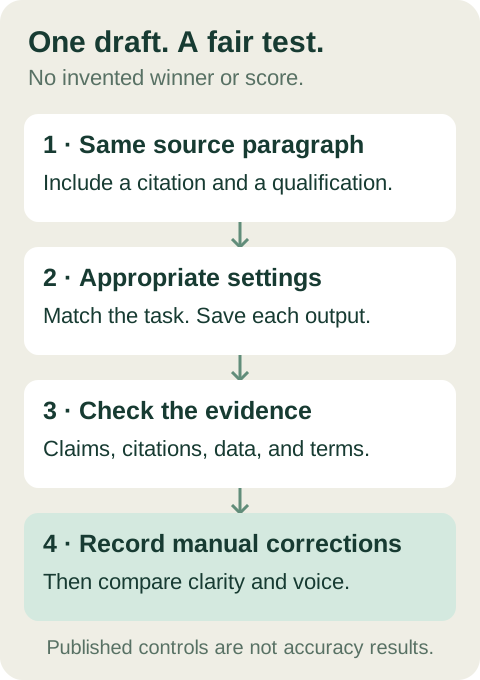
A fair comparison starts with the same source and the same acceptance criteria.
Example: what a useful revision should preserve
This is a constructed teaching example, not an output attributed to either product. The study and citation are fictional.
Draft
Furthermore, the survey indicates an association between weekly planning and lower self-reported deadline stress among first-year students in this sample (Morgan, 2025). However, the design does not establish causality.
Acceptable illustrative revision
In this sample of first-year students, weekly planning was associated with lower self-reported deadline stress (Morgan, 2025). The survey design does not establish causality.
The rewrite removes empty framing while keeping the population, measurement, citation, and causal limitation. Either tool should be evaluated against those details.
Reject: “Weekly planning reduces stress for university students.” That generalizes the population and changes an association into a causal claim. Even if it sounds natural, it fails the test.
For more section-specific cases, use our academic before-and-after example library.
Does either tool guarantee Turnitin or GPTZero results?
A published feature list or a smoother paragraph does not establish a detector pass rate. No detector performance claim is measured in this comparison. PaperHumanizer's on-screen detector-style results are simulated presentation values, not live third-party scans.
Keep AI detection separate from similarity checking and source attribution. QuillBot's paraphrasing and plagiarism guidance also emphasizes citing external source material. Rewording a source does not make the idea yours.
If a submission has been flagged, review the actual report, retain your drafting history, and follow your institution's procedure. See AI detectors versus plagiarism checkers for the distinction.
How to compare paid value without buying on a headline
Check each provider's current plan page rather than relying on a price frozen into an article. Evaluate the controls you actually need, the amount of text you work on, and the corrections required after a trial.
A useful decision is: Does this workflow improve my draft enough to justify its cost and review time? It is not: “Which homepage promises the lowest AI percentage?”
If PaperHumanizer fits your paragraph test, compare our available plans. If QuillBot's alternatives and mode controls fit your routine better, evaluate its current offering directly. You do not need both tools merely because both exist.
Frequently asked questions
Is PaperHumanizer always better than QuillBot?
No universal superiority claim is established here. PaperHumanizer is a focused option for academic humanization and review; QuillBot offers several documented paraphrasing controls. Test the passage and workflow you actually need.
Does QuillBot have an academic humanizer?
Its official Paraphraser documentation lists both Academic and Humanizer modes. Check the live interface and plan availability. Do not assume “paraphraser” means synonym replacement only.
Which is safer for citations?
Neither should be trusted without checking the source-to-claim relationship. PaperHumanizer is designed for citation-conscious academic rewriting, but you still need to inspect every marker and preserve live document fields separately. Follow our citation review checklist.
Should I run text through both tools in sequence?
Not by default. Successive rewrites make it harder to trace changed meaning. Compare separate outputs against the original, choose useful changes, and make a final manual edit instead of repeatedly transforming the same paragraph.
Try the comparison on your own paper
Start with one manageable paragraph. Use PaperHumanizer, compare the result with your original, and record what needed correction. The right tool is the one whose actual output and review process fit your academic work—not the one with the strongest unverified promise.